Copilot Client Portal Alternatives: 4 Paths to Compare
Copilot client portal alternative options depend on what clients must do. Compare Assembly, HoneyBook, ClickUp and a Notion template before you move.
By Notion Client Portal by Cosmo Suite · Editorial policy · Last updated
Disclosure: we make Notion Client Portal, one of the two products compared here. Facts about Assembly (formerly Copilot) come from its public pages, linked with the day we checked them.
The short answer
Choose Assembly, formerly Copilot, when clients need a branded place to message, sign or pay; choose a Notion portal template when they mainly need a project reference and you keep transactions elsewhere.
Feature comparison
| Feature | Notion Client Portal | Assembly (formerly Copilot) | Notes |
|---|---|---|---|
| Client messaging, file sharing, signatures and payments | No | Yessource | Assembly describes these as parts of its branded client experience. The Notion Client Portal template organizes project information only. |
| CRM and ready-made client apps | No | Yessource | Assembly lists a CRM, client experience and 30+ ready-made apps. The template is not a CRM or client login product. |
| Flexible project pages and task references | Yes | Yessource | A Notion template can organize project pages; Assembly also describes project tracking apps. Verify the actual plan and client view you need. |
Pricing
| Product | Price | Checked |
|---|---|---|
| Notion Client Portal | $9 one-time payment | Our current price |
| Assembly (formerly Copilot) | Free and paid plans; check current limits and billing on the vendor pricing pagePublic tiers list different active-contact and internal-user limits. Plan features and prices can change. | As of · source |
Prices change. Assembly (formerly Copilot)'s price is as listed on its own pricing page on the day shown; check it there before you buy.
Who should pick which
Pick Notion Client Portal if
- You want a Notion-based project reference for status, files, tasks and feedback, and can keep signatures and billing in separate services.
- You want to start from an editable template and are prepared to set up and test sharing permissions yourself.
Pick Assembly (formerly Copilot) if
- You need a branded client experience with messaging, file sharing, contracts or payments in the same service.
- Your team needs CRM records, ready-made apps, or plan-based controls for a larger client list.
Where Assembly (formerly Copilot) is strong
- Assembly combines a branded client experience with CRM, apps, messaging and billing features.
- Its current plan page lists contact and internal-user limits by tier.
- Assembly announced that Copilot became Assembly on 30 September 2025; existing client portal experiences continued under the new brand.
“Where should I leave the approval?” Imagine that message arrives as a small studio prepares a website handoff. It is an illustrative scenario, not a client quote. The phrase “Copilot client portal alternative” uses the old name: the vendor is now Assembly. Decide whether clients need a portal where they can complete actions, or a project reference alongside your billing and contract tools.
In Brief
- Assembly is the current name for Copilot. Its client experience includes messages, files, signatures and payments, with limits that depend on the plan.
- A project-management tool fits teams whose main need is assigning and sharing work.
- A Notion client portal template fits project information when you keep transactions elsewhere and test sharing carefully.
- The safest comparison is a one-client pilot that checks what the client can see and do.
Start with the action your client needs to take
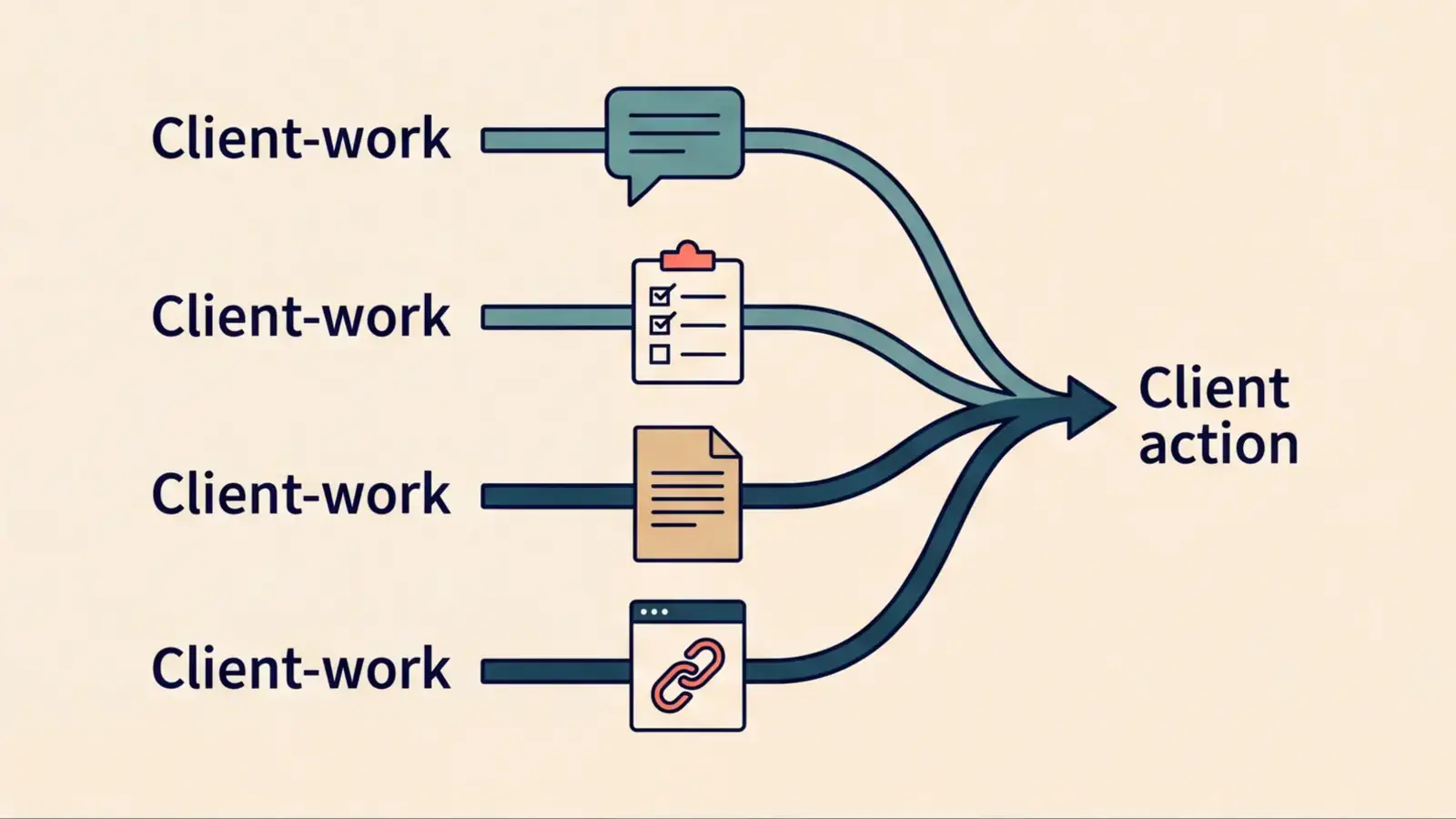
A client portal can be the place where a client signs in and completes work with your team. A project reference can instead gather status, files, tasks and feedback in one place. The needs overlap, though the tools that handle them can be different.
Write down the last three points of friction from real client work. Was the client unable to find the current file? Did an approval get buried in email? Did someone need to sign a contract or pay an invoice? The first two may call for clearer project information. The last two need a tool that handles those actions, not a page that merely records them.
A Notion page is a document-like workspace. A database stores repeatable records, such as tasks. A view shows selected records in a chosen layout. A guest is someone invited to selected Notion content. These building blocks can make a useful client reference. A template will not supply a client service's sign-in, payment or signature workflow.
Copilot Client Portal Alternatives Side by Side
Compare Copilot client portal alternatives by what the client must do after opening the link. Copilot's new name is Assembly, so the comparison includes Assembly as the current product and three other paths for different studio needs.
| Option | What the client can do | Best fit | Trade-off to check |
|---|---|---|---|
| Assembly, formerly Copilot | Use a branded client experience with messaging, files, contracts, payments and apps, according to Assembly's public pages | You want a connected client workflow under one vendor | Compare plan limits for active contacts, internal users, automation and access controls |
| HoneyBook | Work through a client-management flow with proposals, contracts, invoices and payments on its published plans | You need booking and business admin tied to client projects | Confirm which tools are in the plan you would use, plus fees and billing terms |
| ClickUp | Collaborate around tasks and project work with guest roles governed by plan and permission rules | Your studio mainly needs delivery tracking and controlled external task access | Check guest-type rules, permissions and seat requirements before inviting a client |
| Notion Client Portal template | Review organized pages for project details, tasks, files, meetings and feedback | You want a flexible project reference and already handle transactions elsewhere | Set up the pages and sharing yourself; a template does not supply a CRM or transactional portal |
If the Notion option is on your list, the Notion Client Portal template page shows the pages it includes.
Assembly says Copilot became Assembly in September 2025. Its current pages describe a branded client experience, CRM, ready-made apps, messaging and billing. Read the rebrand announcement and compare its current plan details. HoneyBook and ClickUp serve different workflows, so compare their own plan pages and guest-role rules before treating either as a direct replacement.
Copilot is now Assembly, and the name change matters
If an older guide calls the product Copilot, it may describe the same portal now sold as Assembly. Assembly's own announcement says the name changed on 30 September 2025 and describes the continued client experience. Searchers who type the old brand can still be looking for that product, rather than a Microsoft Copilot feature.
That distinction changes what you should compare. Start from the current Assembly pricing page and features, not an old article that may show prior plan names or limits. The current page lists active-contact and internal-user caps by tier. It also describes CRM, client experience, app builder, messaging, billing and payments. Plan access changes, so verify the current limits and features before moving clients.
Assembly is the stronger fit when clients need to do more than read project notes. If you rely on a single branded destination for client communication, documents and payments, a Notion template will not reproduce that workflow by itself. Keep Assembly, or evaluate another dedicated client service, if those actions need to stay connected.
The dividing line is the client action loop
Start with the loop between a client request and the next recorded action. A feature checklist can come after that.
A project reference can show the current deliverable, a task owner, a file link and a place for feedback. A portal service may also support authenticated client access, messaging or transactions. If a client must submit a document, sign an agreement or pay an invoice, check that the chosen system supports the action and leaves a record your team can find later.
A Notion client project portal template can organize pages for a project brief, schedule, account-access notes and feedback while the transaction records stay in their existing services. The template does not process a payment, create an electronic signature, send notifications or run automations. Keep sensitive credentials out of shared pages. For how Notion access works, read its sharing and permissions guide and test the exact content each client can reach.
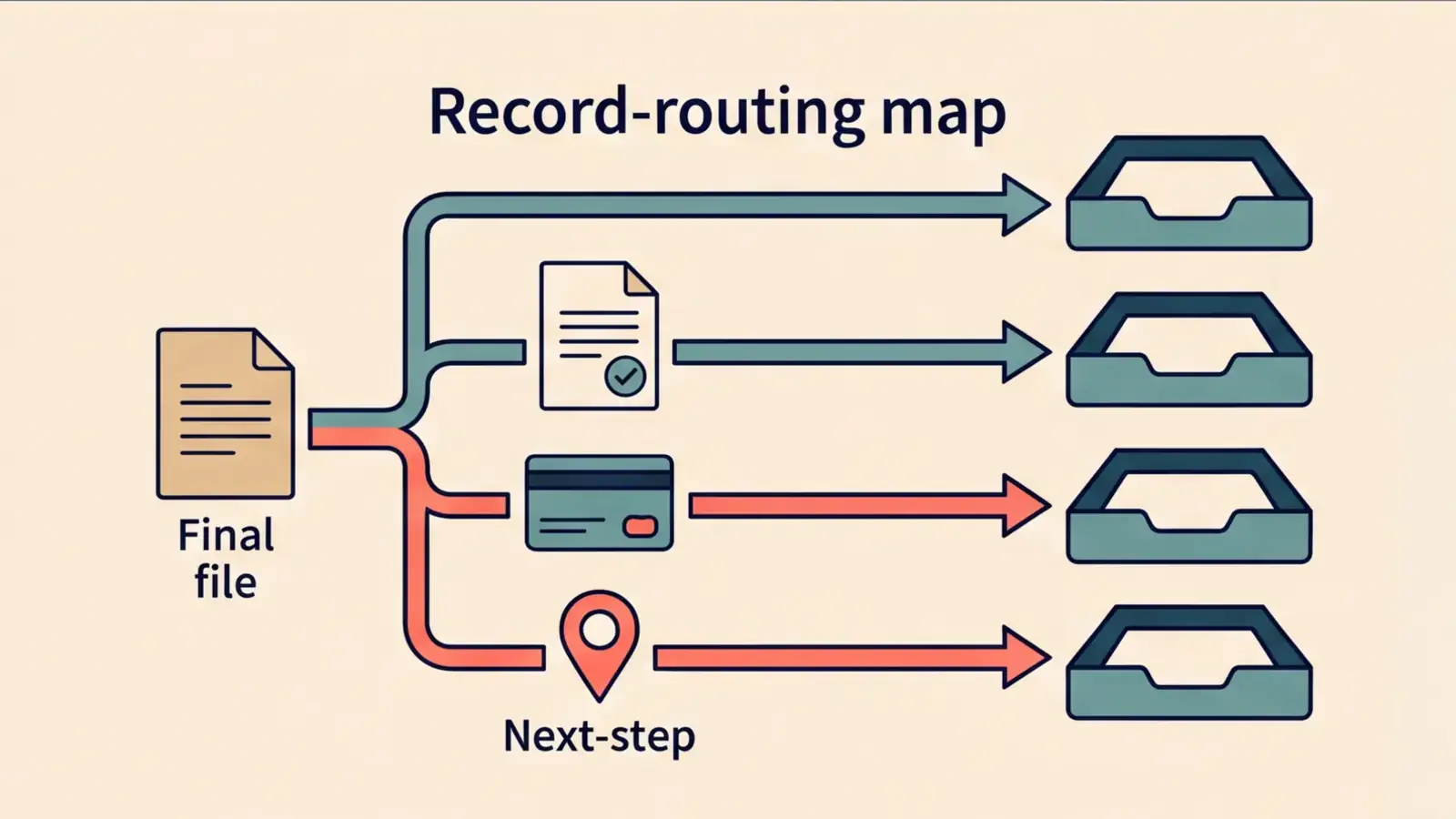
This boundary also helps when a studio keeps two tools. Give each record one owner. The invoice lives in the billing service. The signed contract stays in the signing service. The client-facing project page points to the current file and describes the next project action. Do not make the Notion page look like the payment record or approval system if it is only a reference to them.
Route one pilot project before moving the rest
Before you switch tools, map one low-risk project from the client's point of view. The worksheet below is an illustrative method, not a measured result. Its purpose is to expose records that have no clear owner after a move.
| Record or action | Current owner | New home or decision | Client test |
|---|---|---|---|
| Signed agreement | Contract service | Keep in the signing service; link to the final record | Can the client find the signed copy? |
| Invoice and payment | Billing service | Keep in billing; show only a status or link in the project reference | Can the client reach the right payment page? |
| Current deliverable | File workspace | Link one approved version from the client page | Can the client tell which version is current? |
| Feedback and approval | Feedback channel | Choose one named place and record the approved version | Can the client leave a response and see what it applies to? |
| Next project step | Task tracker | Assign an owner and due date in the system the team maintains | Can the client find the next action without asking by email? |
For example, a small brand studio could leave its signed scope and invoice in the services already used for those jobs. It could place the current logo files, review date and open feedback in one project reference. The studio should then test the page with a separate client account or browser session and confirm that internal notes and other clients' information stay private.
Start with one low-risk client before moving active work. Ask one client to find the current file, identify the next step and leave feedback. Note where they hesitate, fix the route, and decide whether the trial removed a tool or only moved the same confusion to another screen.
What the client sees in a Notion portal
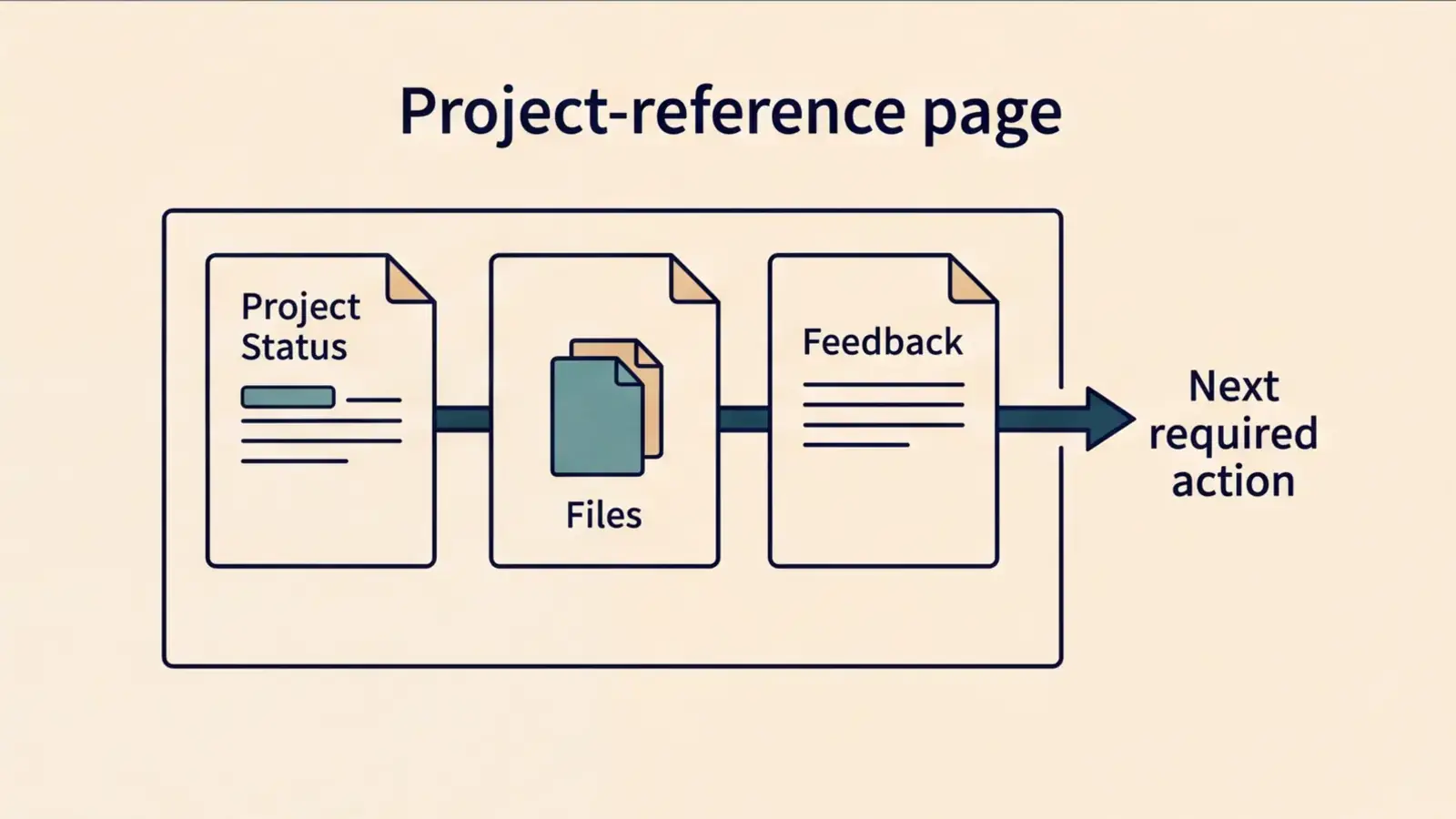
Put the current status and next action where a client can find them quickly. It might open on a project page, then link to the task, meeting notes, feedback and files that belong to that client.
The Notion Client Portal template includes a nine-page client portal: Introduction, Contract, Payment, Task, Questionnaire, Workspace, Meeting, Account access and Feedback. These names describe places to organize information. The template does not sign contracts or collect payment for you. It also does not prove that a client can open a page without a Notion account. Access depends on the sharing method, account type and permissions in effect, so review Notion's current rules and test before sharing.
Keep the studio dashboard private. Review every shared parent page, linked database, subpage and file. A page that looks client-ready to its owner can still expose unrelated material if permissions are not checked. For access-sensitive records, use named invitations and verify the recipient's view.
Why Trust This Article
Cosmo Suite makes the Notion Client Portal template. This page uses Assembly's public rebrand and plan pages, official HoneyBook and ClickUp product documentation, Notion's sharing guide and the template's approved contents list, checked on 9 November 2026. It is a feature and workflow comparison, not a hands-on review of the vendors. We checked the public pages named above against the template contents list. Read the about page for publisher details and the editorial policy for our review process. Plan details can change; confirm them directly before switching.
When the Notion Client Portal template fits
The Notion Client Portal template may suit a small studio that wants a client-facing project reference in Notion and is comfortable keeping billing and signatures in other services. It includes the client portal pages, per-project portals, five business hubs, dated planners for 2026 and 2027, and a Canva edit link. It works with Notion's free plan, according to the approved contents list.
If your current problem is that clients cannot locate status, files or feedback, you can review the template's client portal structure and compare it with a client portal template checklist. For a broader explanation of page setup, see how to build a Notion client portal. The template is a page system, so you remain responsible for deciding which content to share and checking the permissions.
If the replacement must let clients sign in, send secure messages, sign contracts, pay invoices or trigger reminders, choose a service that explicitly supports those actions. Assembly is already designed around that kind of client experience. A Notion template is better understood as a flexible project reference alongside the systems that handle transactions.
For the pilot, watch whether the client can complete the next action and whether your team can find the record afterward. Run the trial with one client before retiring a working portal.
Frequently asked questions
Is Copilot client portal now Assembly?
Yes. Copilot announced the Assembly rebrand on 30 September 2025. The client portal product continued under the Assembly name, so current plan information is on Assembly's site.
What is a good Copilot client portal alternative?
Start with the client action you need to replace. Assembly suits a branded portal with messaging and transactions; a Notion template suits a project reference when billing and signatures remain elsewhere; a project-management tool suits task delivery.
Can Notion replace Assembly?
Not for every job. A Notion client portal template can arrange project pages, tasks, files and feedback. It does not provide the same bundled client experience, CRM, payment collection or signature workflow.
Does a Notion client portal require clients to sign in?
It depends on the sharing method and page permissions. Check Notion's current sharing rules for the exact setup, then test the client view in a separate browser or account before sending a link.
How do I switch from Assembly to another client portal?
Map each client action and record to its new owner, test access with one low-risk client, and keep the old workflow available until messages, files, approvals and open payments have a clear destination.
