HoneyBook Alternatives: 4 Options for Different Client Workflows
HoneyBook alternative options compared by contracts, payments, automation and client portals. See when Dubsado, Bonsai or a Notion setup fits better.
By Notion Client Portal by Cosmo Suite · Editorial policy · Last updated
Disclosure: we make Notion Client Portal, one of the two products compared here. Facts about HoneyBook come from its public pages, linked with the day we checked them.
The short answer
Choose Dubsado or Bonsai when you want another business system with client workflows; choose a Notion portal when you mainly need a flexible project space and will keep billing and contracts elsewhere.
Feature comparison
| Feature | Notion Client Portal | HoneyBook | Notes |
|---|---|---|---|
| Invoices and payments | No | Yessource | The Notion portal template organises project information; it does not process payments. |
| Contracts and proposals | No | Yessource | HoneyBook includes proposals and contracts. Use a separate service with a Notion portal. |
| Flexible project pages | Yes | Yessource | Notion pages can be rearranged; HoneyBook supplies client-project workflows. |
| Automations | No | Yessource | HoneyBook Essentials lists automations; a Notion template does not automate the client lifecycle. |
Pricing
| Product | Price | Checked |
|---|---|---|
| Notion Client Portal | $9 one-time payment | Our current price |
| HoneyBook | $29/month billed yearly for US StarterUS pricing displayed on HoneyBook's pricing page when checked. Payment processing fees are separate. | As of · source |
Prices change. HoneyBook's price is as listed on its own pricing page on the day shown; check it there before you buy.
Who should pick which
Pick Notion Client Portal if
- You want a Notion-based project hub and already handle contracts and payments elsewhere.
- You prefer to adjust pages and sections yourself instead of adopting a complete CRM workflow.
Pick HoneyBook if
- You want proposals, contracts, invoices and payments in one service.
- You need automated follow-ups or scheduling as part of your client process.
Where HoneyBook is strong
- HoneyBook combines client projects with proposals, contracts, invoicing and payments.
- Its Essentials plan lists automations, scheduling and QuickBooks Online integration.
- Clients can use HoneyBook's own client portal for project work.
If you searched for a HoneyBook alternative, start with the job you want to move. HoneyBook may cover more than you need. Or you may want a different client portal while keeping invoices and contracts in their current tools.
These choices solve different problems. HoneyBook bundles client projects with business tools. Dubsado and Bonsai offer broader client-management workflows. A Notion portal gives you a flexible project space. Payments, signatures and automated follow-ups still need other services. Pick by the steps you need covered.
Key Takeaways
- Choose Dubsado or Bonsai when you want another client-management system.
- Choose a Notion portal when project pages are the main need and billing stays elsewhere.
- Keep HoneyBook if its contracts, payments and follow-ups remove manual work.
HoneyBook alternatives at a glance
The right HoneyBook alternative depends on whether you want another all-in-one service or only a place to organise project information.
| Option | What it covers | Main trade-off | Best for |
|---|---|---|---|
| Dubsado | Client portals, forms, invoices, contracts; Premier adds workflows and scheduling | More setup than a simple page structure | A configurable client-management system |
| Bonsai | Client portal, invoices, proposals, contracts, forms and scheduling by plan | Confirm plan and seat pricing for your team | Freelancers wanting business and client tools together |
| Notion client portal | Project pages, tasks, links, notes and feedback structure | Billing, signatures and automation stay elsewhere | A flexible project hub alongside existing services |
| Keep HoneyBook | Client projects, proposals, contracts, invoices, payments and portal | Subscription and processing fees; workflow may be broader than you need | A business workflow you already rely on |
Prices and plan contents below were checked on 15 October 2026. We compared vendor-published features and did not test the products live. Regional pricing, taxes, promotions and processing fees can change the total. Confirm the details on each vendor's page before switching.
First decide what HoneyBook does for you
HoneyBook is a client-management service that combines projects with business tools. Its pricing page lists invoices and payments, proposals and contracts, a calendar, client portal and basic reports on Starter. Essentials adds a scheduler, automations, QuickBooks Online integration and SMS reminders. Premium adds advanced reports and more team capacity.
That bundle matters when you compare costs. A Notion page may give you the project layout you want, but you still need a separate way to send a contract, collect a signature, invoice the client and record payment. If those jobs are part of the reason you use HoneyBook, compare full workflows rather than portal screens.
HoneyBook's US pricing page listed Starter at $29 per month billed yearly when checked on 15 October 2026. Payment processing fees are additional. Treat this as a dated snapshot and confirm your checkout price.
Write down each step you currently complete: inquiry, proposal, agreement, scheduling, project updates, invoice, payment and closeout. Mark which steps HoneyBook handles and which you do by hand. That short list gives you a fair test for alternatives.
Dubsado: compare it when you want configurable workflows
Dubsado is worth comparing when you want a business-management platform with client portals, forms, invoices and contracts, plus the option to add automated workflows.
Dubsado lists two plans. Its pricing page showed Starter at $335 per year and Premier at $525 per year. Both include client portals, invoicing and payment plans, forms and email templates. Premier adds Flows, scheduling, public proposals and integrations. Check the page for user and extra-brand terms that apply to your setup.
The practical question is how much configuration you are willing to own. If you need workflows to respond to client actions, map one real project from inquiry through delivery before migrating. Confirm that the forms, messages and automation steps match the process you actually use. A long list of features does not tell you how much setup your workflow needs.
Best for: a freelancer or studio that wants a configurable client system and expects to use its workflow tools.
What to verify: the plan's current features, additional user costs, and whether your current forms and process can move cleanly.
Bonsai: compare it when business admin belongs in the same tool
Bonsai may suit freelancers who want a client portal connected to proposals, contracts, invoicing and other business-management features.
Bonsai is a business-management service with client tools. Its pricing page lists plans by user and billing period. At the time checked, Essentials was $25 per user each month, with a lower annual rate shown on the page. It lists client portal, forms and questionnaires, scheduling, invoices and payments, proposals and contracts in Essentials. Higher plans add client tasks and messaging, reporting or custom permissions. Confirm the current plan table and seat count before comparing totals.
Per-user pricing changes the comparison for a team. Calculate the annual subscription for the people who need access, then include any payment processing charges that apply to your chosen methods. During a trial, test a real client journey: intake, agreement, task updates, invoice and payment status. Check what a client can view and change.
Best for: a freelancer who wants client work and business administration connected, and whose team size fits the plan price.
What to verify: which features sit in each tier, the number of seats, and payment charges in your country.
Notion: use a client portal when the project space is the main need
A client portal is a shared space where a client can find project details and take agreed actions. A Notion setup is a fit when you mainly want a customisable place for status, deliverables, links, meeting notes and feedback.
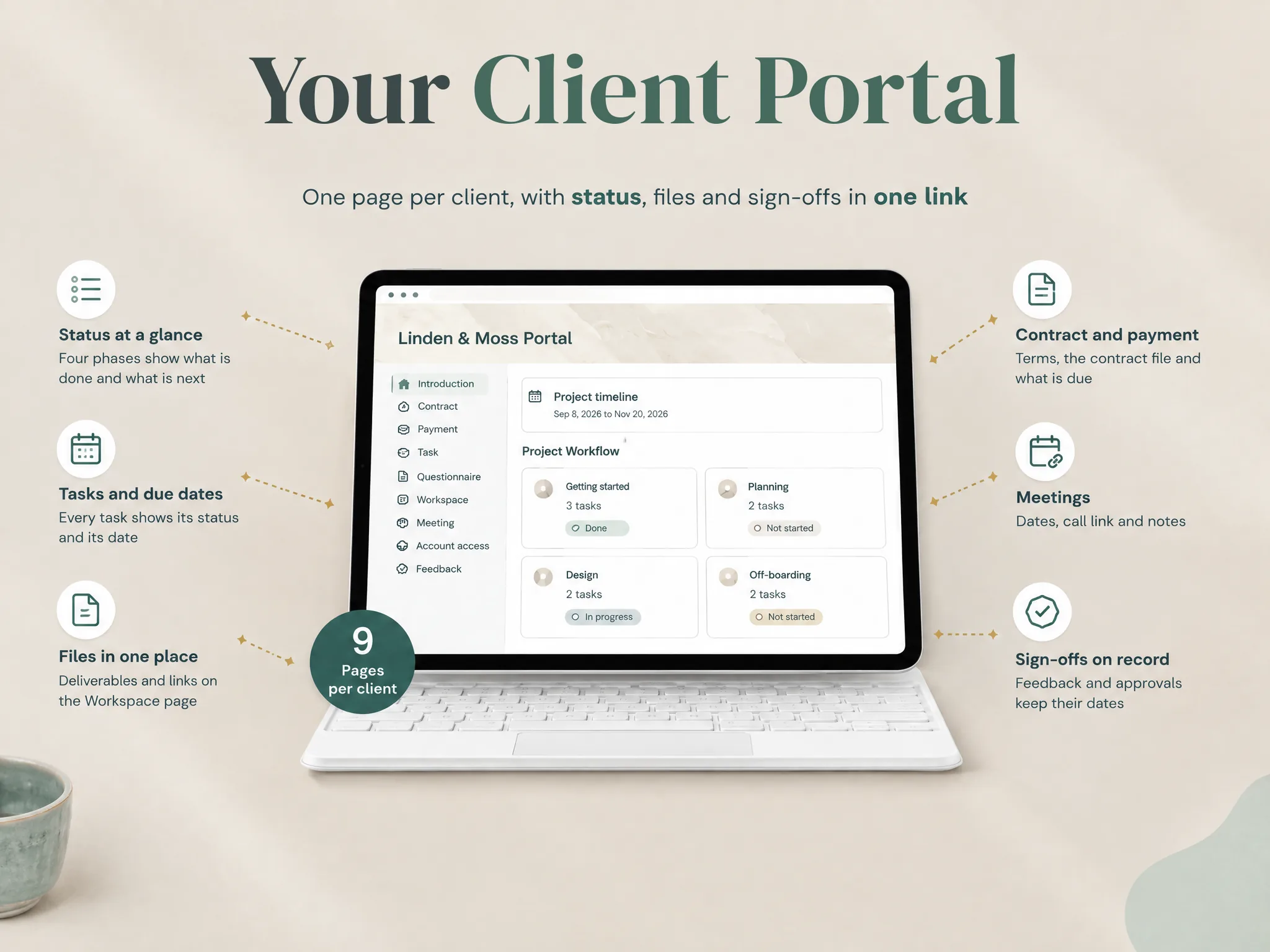
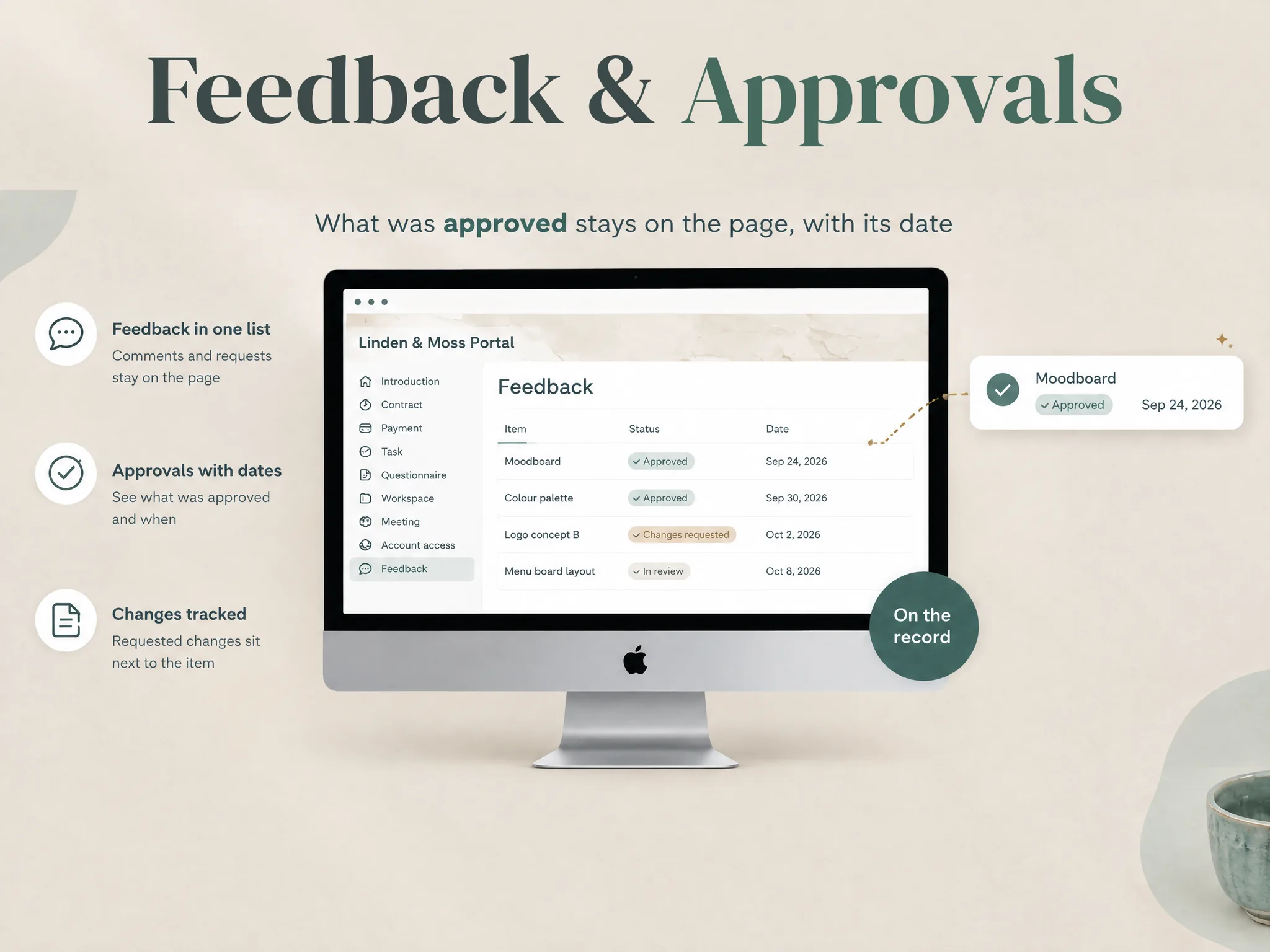
The Notion Client Portal template includes a standalone client portal with pages for Introduction, Contract, Payment, Task, Questionnaire, Workspace, Meeting, Account access and Feedback. These pages organise information. They do not execute a contract, collect a payment or automatically chase a client. Keep the service that handles each transaction, and link to it from the relevant project page if that fits your process.
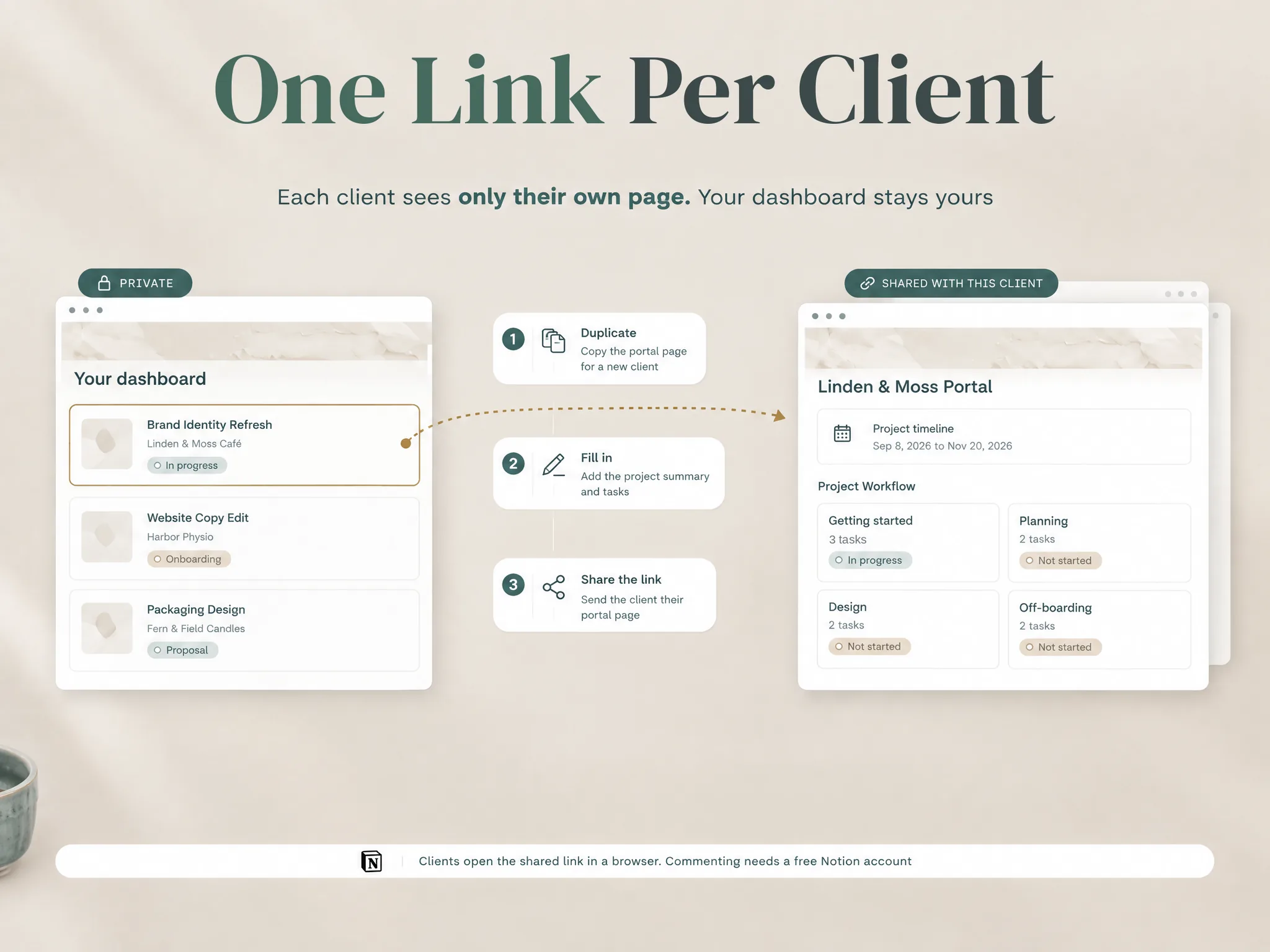
The trade-off is a lighter system with more responsibility on you. You decide the layout, maintain project details and choose how to share each page. A template does not guarantee that one client cannot see another client's information. Review parent pages, linked databases and sharing settings, then test access using the intended client role before you share real work.
Notion's Free plan and a paid template are separate costs. Check Notion's current plan limits and guest rules for your workspace. Avoid making a page public just to get around an access limit when it contains information meant for a named client.
Best for: a freelancer who already has reliable contract and payment tools and wants one adaptable project page for clients.
What to give up: an integrated client lifecycle. You will still handle billing, signatures, reminders and other services outside Notion.
Keep HoneyBook if the bundle saves you from stitching tools together
Switching helps only if it removes a specific problem. If you use HoneyBook's proposals, contracts, payment schedules, reminders and client portal, moving only the portal can leave you with more manual handoffs.
Before leaving, identify the specific friction. Is the subscription cost the issue? A feature you cannot configure? The client-facing experience? Or are you paying for functions you do not use? If the problem is one narrow part of the process, ask whether another HoneyBook plan or a small change to your current workflow solves it. Verify current plan rules with HoneyBook directly.
If you do move, export or preserve the project records you need, list open invoices and agreements, and decide which tool becomes the source of truth for each item. Tell clients where to find active project information. Do not close the old account until you have checked the records and links you need to retain.
A short test before you switch
Run the same small project through each serious option. Use a project that has an intake form, a scope document, one deliverable, a feedback round and an invoice. Do not use confidential client information in a trial unless the service's terms and your own policies allow it.
For example, a solo designer might receive an inquiry, send a proposal, gather a brief, share a draft and collect approval before invoicing. With a Notion portal, the designer could organise the brief, draft link and feedback there, then use separate services for proposal signatures and billing. A full client-management tool may keep more of those steps together. This is a sample workflow, not a measured product test.
| Test | What to check |
|---|---|
| Client view | Can the client find the current deliverable and next action? |
| Scope and approval | Can you record the agreed scope and approval in the right tool? |
| Billing | Can you create, send and reconcile an invoice the way you need? |
| Access | Can you remove access, and can you test what each client sees? |
| Maintenance | Who updates the status, links, reminders and records? |
Count the work that remains manual. Then compare the full annual subscription and payment costs with the value of the steps the platform covers. For Notion, include the services you will keep for signatures and payments. Include the cost of extra admin when you compare a lower software price.
Why trust this comparison
Notion Client Portal by Cosmo Suite publishes this comparison and sells the Notion template discussed here. About us explains who runs the site. Our editorial policy describes how we check posts; contact us to flag an error. We checked vendor plan pages on 15 October 2026. We compared their published feature lists with the template's contents. We have not tested each service in a live client workflow. Check current terms and access settings before moving client records.
Where Notion Client Portal fits
Notion Client Portal is a project-information template for freelancers. It provides a ready page structure for a private business dashboard, standalone client portals and project sections such as tasks, payment links, feedback and onboarding. HoneyBook's client-management workflow covers more of the client lifecycle.
Use it when the client needs a clear view of project status and you are comfortable keeping contracts and payment collection in the services that already handle them. Review the template contents and compare the layout with one active project before adopting it. Remove sections you do not use, then check access before sharing. The standalone client portal layout can be the place to start that review.
If your main goal is to automate the client lifecycle, compare HoneyBook, Dubsado and Bonsai on their current plans. Test the workflows you need. If you mainly need a flexible place to organise project work, a Notion portal may be enough alongside the tools you already trust.
Frequently Asked Questions
What is the best HoneyBook alternative?
There is no single best choice for every workflow. Dubsado and Bonsai offer client-management tools with portals and business features. A Notion portal is a lighter project hub when contracts and payments stay elsewhere. Choose based on the tasks you need the platform to complete.
Is there a free HoneyBook alternative?
Notion offers a Free plan, but a template may cost separately and Notion does not provide HoneyBook's invoicing and payment workflow. Dubsado and Bonsai offer trial options. Check each vendor's current limits and terms before moving client work.
Can Notion replace HoneyBook?
Notion alone cannot replace HoneyBook if you use its payment processing, contracts, proposals or workflow automation. You can use Notion for project information while separate services continue to handle those jobs. That setup works only if you are willing to maintain the handoffs.
Is Dubsado cheaper than HoneyBook?
Compare the specific plan and billing term. Dubsado's pricing page listed Starter at $335 per year and Premier at $525 per year. HoneyBook listed Starter at $29 per month billed yearly on its US page, or $348 across 12 months before any fees. The feature sets differ, and processing fees or additional users can change total costs.
Does HoneyBook include a client portal?
Yes. HoneyBook lists a client portal with its plans. Before choosing based on portal features, test the client-facing view and confirm it supports the files, status updates and access controls you need.
Can I use Notion with HoneyBook?
Yes. You can keep HoneyBook for proposals, agreements and payments while using Notion for internal planning or project documentation. Decide which service owns each record. Avoid copying sensitive details into another workspace unless the access and retention rules are clear.
Sources
- HoneyBook pricing and features, checked 15 October 2026.
- HoneyBook plan comparison, checked 15 October 2026.
- Dubsado pricing, checked 15 October 2026.
- Bonsai pricing, checked 15 October 2026.
- Notion pricing, checked 15 October 2026.
Frequently asked questions
What is the best HoneyBook alternative?
It depends on the part of HoneyBook you want to replace. Dubsado and Bonsai offer broader client-management workflows. A Notion portal suits project information when you will keep billing and contracts in separate tools.
Is there a free HoneyBook alternative?
Notion has a Free plan, but the client portal template is a separate purchase and Notion does not replace HoneyBook payments or contracts. Dubsado and Bonsai offer trials; check their current terms before signing up.
Can Notion replace HoneyBook?
Not by itself if you rely on HoneyBook for proposals, contracts, invoices, payment collection or automated client workflows. Notion can hold project pages, task lists and links, while those functions stay in separate services.
Is Dubsado cheaper than HoneyBook?
Compare the plan you need and its billing period. Dubsado lists Starter at $335 per year and Premier at $525 per year; HoneyBook lists Starter at $29 per month billed annually. Feature limits and processing fees also affect the total.
Does HoneyBook have a client portal?
Yes. HoneyBook lists a client portal on its plans. If your concern is portal branding or what clients can see, test the actual client view during a trial before moving active projects.
Can I use Notion with HoneyBook?
Yes. You can keep HoneyBook for the client workflow it already handles and use Notion for internal notes or project documentation. Decide which tool owns each record, then avoid duplicating sensitive or changing information.
